



share, and discover the largest photo-sharing app
LinkedIn for Windows is a dedicated official Windows app, allowing professionals from all over the world to connect with each other. The free-to-use app allows users to create their professional profile, expand it to huge companies, and reliably search and apply for jobs. You will be capable of joining a huge network and learn new skills using a comprehensive suite of tools.
The program, with over 1 billion registered users from over 200 countries, has become the world’s largest social networking platform for professionals, as it offers job opportunities via sharing of CVs, offering job-related news content, and so on.
What is LinkedIn?
LinkedIn, developed by Reid Hoffman and Eric Ly and launched in 2003, is an American business and employment-oriented social networking platform. It is a freemium program that helps to navigate the most competitive job market, enabling professionals to search for their desired jobs while using the multifaceted toolkit.
You can use the app via your web browser, and even as a standalone application by simply visiting the official Microsoft Store page of the app. It is a seamless and efficient way of engaging people such as job seekers, entrepreneurs, and even seasoned professionals, allowing users to enhance their daily workflow and reliably achieve their career goals.
LinkedIn Features
Job Search Option
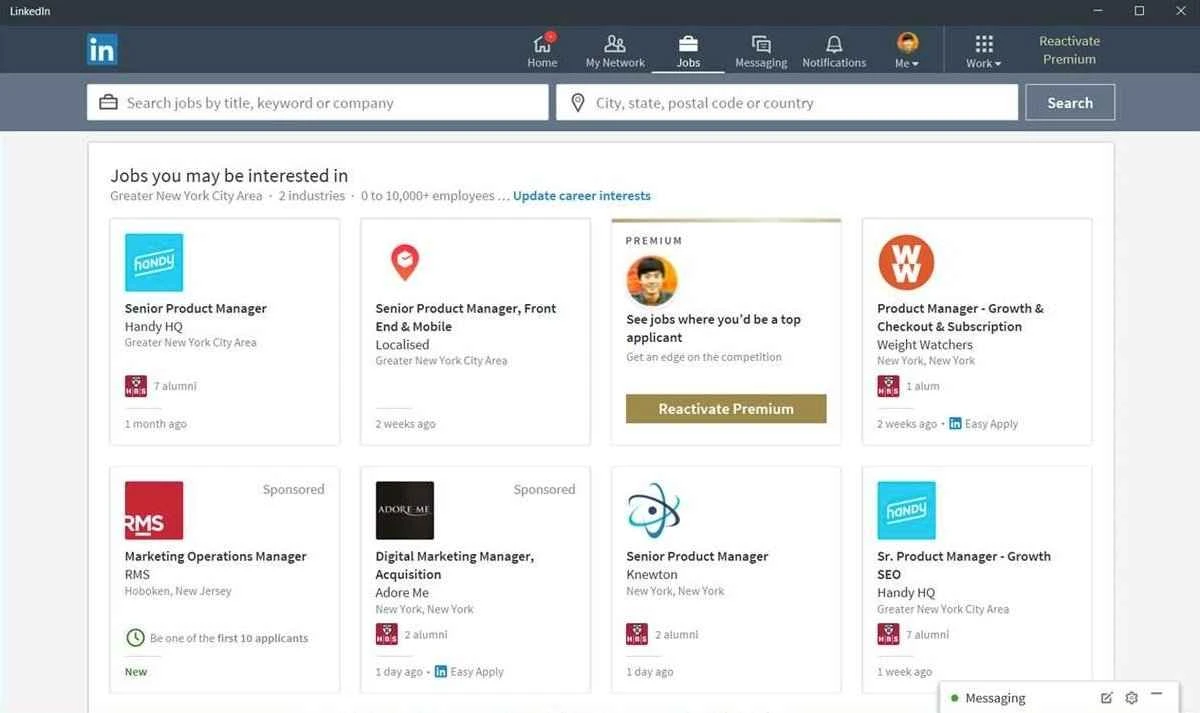
The app offers a comprehensive job search option, allowing users to search and access job opportunities that better suit their talent and preferences. It is possible to search jobs within different criteria, including name, company, location, keywords, or industry. It also enables users to filter jobs using advanced filter options, allowing users to narrow down the results according to experience level, salary, or contract type. In this way, you can save jobs according to your requirements and apply for later.
Professional Skills Elevation
It enables users to create a stunning profile, turning it into a dynamic virtual resume, and display their skills, accomplishments, and experience artfully. It offers customizable settings for potential employers to explore an awesome professional journey. For job seekers, Open to Work is another significant feature that enhances the chances of receiving messages from recruiters. Moreover, the enhanced social networking capabilities help to stay in touch with friends, colleagues, and classmates.
Skill Development Resources
You will also be capable of joining a wide variety of skill development resources, including online courses, articles, video tutorials, and so on. All such material proves quite useful to improve your professional skills, covering a wide variety of topics relevant to various industries. In this way, you can reliably stay in touch with labor market trends, updating and enhancing your knowledge.
Real-time Notifications
While working as a native desktop app, it also sends real-time notifications to alert you about any new updates. So, in the way, you do not need to open the app all the time; instead, get notifications for messages, job offers, and updates right on your desktop, continuing with your other potential workflow. This innovative feature helps you stay in touch and informed without missing an important opportunity or connection.
AI-Integration
In fact, the comprehensive feature is available only for premium users, as it is based on OpenAI technology and represented as a sparkle emoji available under job listings. Simply click the emoji, and you are prompted to an AI chat function, and can easily ask for the most suitable jobs according to your profile. It not only informs you about jobs, but also gives details of company perks, the inherent challenges, and job prospects as well. It also offers a summary creator for lengthy posts.
Quick Insights
You can easily get quick insights into company culture, benefits, and specific industry details, as multiple innovative analysis tools offer career advice while analyzing the content available on your feed. However, the feature is in beta mode but offers a quick and smart way to manage the daunting challenges of job searching.
User Interface
The clean and modern user interface is organized with quick navigation through professional connections and job listings. The design with minimum clutter and enhances productivity, displayed through tabs on the main screen, including Home, My Network, Jobs, Messaging, and Notifications. You will find an optimized and smooth user experience, regardless of the screen size or resolution of your device.
Direct Messaging
You can stay engaged with other users available on the platform and chat with others to discuss matters of the same interest. It is available for free and offers basic functionality, but for accessing advanced functionality, specifically AI capabilities, while purchasing the premium plan as well.
Pros
- One of the largest socio-sharing platforms for job seekers and professionals
- Offers Open to Work features to receive messages from recruiters
- Supports multiple networking and career development tools
- User-friendly and modern interface with straightforward navigation
- Sends real-time notifications
- Free to use and cross-platform compatibility
Cons
- Advanced functionality requires a premium version
- Slow loading time